
Trying to pin down web design fees can feel like you're asking, "how long is a piece of string?" But it doesn't have to be that vague. For a Kiwi small business, a straightforward brochure-style website usually lands somewhere between NZD 1,000 and 3,000. If you need to sell products online, you're looking at an e-commerce site, which can range from NZD 5,000 to over 20,000.
Ultimately, the final price tag comes down to what you actually need the website to do.
How Much a New Website Really Costs in New Zealand
Think of it like buying a vehicle. You wouldn't expect a reliable runabout hatchback to cost the same as a custom-built work ute kitted out for a specific trade. They both get you from A to B, but they're built for entirely different jobs and require different levels of engineering. Websites are exactly the same.
A simple online brochure for a local plumber is your hatchback—it's professional, efficient, and gets the job done by showing off services and making it easy for people to call. On the other hand, a full-blown e-commerce store with secure payments and inventory management is the custom ute—it’s a specialised machine built to handle complex tasks and actively drive sales.
Getting your head around this difference is the first step to setting a budget that makes sense for your business.
Setting Clear Budget Expectations
To make it easier, let's break down where your project might fit. We've put together a quick table summarising the typical cost brackets you'll find here in New Zealand. This will help you get a realistic idea of the investment required before you even start talking to designers.
Typical Website Cost Brackets in New Zealand
| Website Type | Typical NZD Price Range | Best Suited For |
|---|---|---|
| Brochure Website | $1,000 – $3,000 | Service businesses, tradies, and professionals needing a solid online presence to build trust and generate enquiries. |
| E-commerce Website | $5,000 – $20,000+ | Businesses selling products directly to customers online, requiring shopping carts, payment processing, and inventory features. |
| Enterprise / Custom | $35,000+ | Large-scale operations needing unique functionality, custom software integrations, or complex, multi-layered platforms. |
These figures aren't set in stone, but they give you a solid starting point for what to expect based on the complexity of your project. As you add more features, the investment naturally grows.
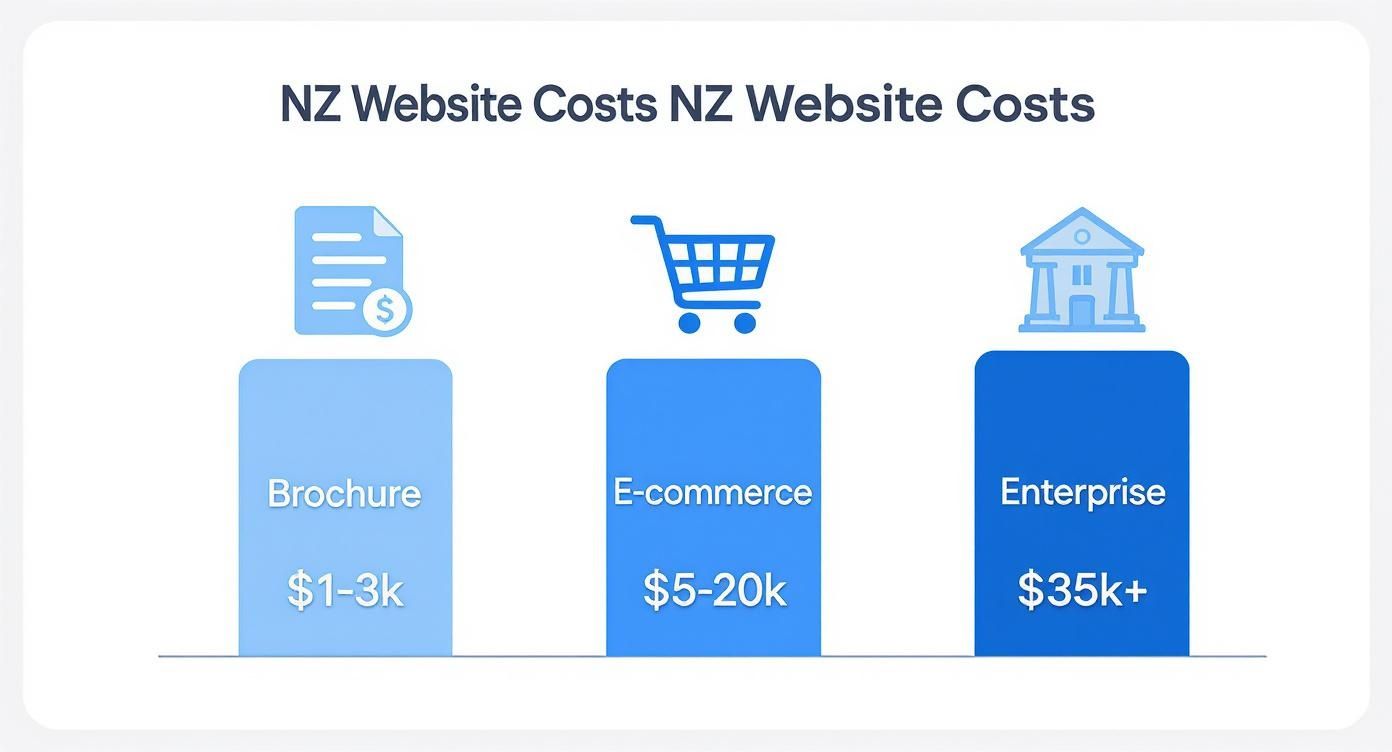
As the chart shows, the investment climbs pretty steeply once you move into selling online or need custom features built just for you.
The real goal isn’t to find the cheapest price, but to find the best value. A well-built website is an investment in your company's growth, not just another bill to pay.
Armed with these ballpark figures, you can have much clearer conversations with potential web designers. You'll be able to look at a quote and understand why it's priced the way it is and what factors are driving the cost. This is the foundation for any small business website design in NZ that’s serious about getting more leads and phone calls.
Decoding Web Design Pricing Models
Getting a quote for a new website can feel like you’re trying to crack a secret code. The numbers and jargon seem to change with every designer, leaving you wondering what you're actually paying for. The good news is, almost all web design fees boil down to one of three main pricing models.
Get your head around these, and you'll be able to compare quotes like a pro and pick a partner whose process actually fits your business. It's about shifting the conversation from "how much?" to "how is that price calculated and what do I get for my money?". To really get the hang of this, it's worth understanding the bigger picture behind any good pricing strategy for services.
Fixed-Price Projects
This is the most straightforward model out there: the fixed-price project. The designer gives you a single, all-in quote for a very specific scope of work. You know the final cost right from the get-go, which is a massive win for budgeting.
This approach is perfect for projects with a clear, locked-in outcome. Think a simple five-page site for a local tradie or a dedicated website for a new product launch. The only catch is its lack of flexibility. If you get halfway through and decide you need another feature or want to change the layout, you’re looking at scope creep and extra charges.
A fixed-price model gives you absolute certainty, which is brilliant for well-defined projects. The trade-off is that you need a crystal-clear vision from day one, because changes can get expensive and messy.
Hourly Rates
On the flip side, paying an hourly rate gives you maximum flexibility. You simply pay the designer or agency for the actual hours they put into your project. This is the go-to for smaller, one-off jobs, ongoing tweaks, or projects where you know things are likely to change as you go.
For instance, if you just need a couple of pages updated or a bug sorted, paying by the hour is way more sensible than kicking off a whole new project. The obvious risk? Budget blowouts. Without a tight rein and clear communication, those hours can stack up fast, and you could end up with a much bigger bill than you planned for.
For an hourly setup to work, you need:
- Clear Communication: Regular updates on hours worked and what's been achieved.
- Transparent Tracking: Access to timesheets or a project tool showing exactly where the time went.
- Defined Tasks: Work needs to be broken down into small, manageable chunks to keep things on track.
Monthly Retainers
The third option, a monthly retainer, isn’t really about a single project—it’s about an ongoing partnership. You pay a set fee each month for a certain amount of the designer’s time or for a list of ongoing services. This is the perfect model for any business that needs continuous support.
A retainer means you’ve got an expert in your corner for regular updates, security checks, performance improvements, and content changes. It turns the relationship from a one-off job into a long-term collaboration focused on growing your business. It’s especially valuable if you're investing in things like SEO or content marketing, which need consistent work to deliver results. You get peace of mind knowing your website is being actively looked after and improved every single month.
The Key Factors That Drive Your Website Costs
Ever wondered why one quote for a new website comes in at $2,000 and another hits a staggering $20,000? That massive difference isn’t just random numbers. It all comes down to the specific ingredients needed to build your online presence, and understanding them is the key to setting a realistic budget.
Think of it like building a house. A simple, off-the-plan build will always be cheaper than an architect-designed home with a custom kitchen and unique features. Both are houses, but the complexity, skill, and time involved are worlds apart. Your website is exactly the same.

Custom Design vs Templates
One of the biggest cost decisions you'll make is choosing between a pre-made template and a fully custom design. A template is like buying a suit off the rack—it’s fast, affordable, and looks pretty good for most situations. A designer can tweak it to fit your brand, but its core structure is locked in.
A custom design, on the other hand, is a bespoke, tailored suit. It's built from scratch around your specific business goals, your brand, and how your customers think and act. This takes serious strategy, wireframing, and user experience (UX) work, which means more expert time and a higher price tag.
The very foundation of your site, starting with selecting the right WordPress theme for business, plays a massive role in the final cost. A good premium theme might seem like an upfront expense, but it can save hundreds of pounds in development hours compared to wrestling with a basic, free template.
E-commerce and Custom Functionality
If your website is just a digital brochure, the technical side is fairly simple. But the second you need it to do something clever, the price starts to climb. Fast.
E-commerce is the perfect example. Adding a shopping cart, setting up secure payment gateways like Stripe, and managing inventory is a serious bit of work. Every product option, shipping rule, and tax calculation adds another layer of complexity that needs a specialist to build it right.
Beyond just selling things, you might need other custom features built in:
- Booking Systems: An absolute must for service businesses. This lets clients book appointments directly on your site, saving everyone a headache.
- Member Portals: If you need a private, login-only area for customers to get exclusive content or manage their accounts, that’s a custom build.
- Advanced Forms: Think multi-step quote calculators or detailed enquiry forms that feed straight into your CRM system.
Every one of these features requires custom coding, careful integration, and a lot of testing, all of which are major cost drivers.
The Non-Negotiable Extras: Content and SEO
Here’s the thing: a beautiful, functional website is completely useless if no one can find it. This is where professional content and foundational Search Engine Optimisation (SEO) come in. They aren't optional extras; they're critical investments.
Proper copywriting makes sure your message is sharp, persuasive, and actually connects with your ideal customer. It’s the difference between a website that just lists what you do and one that convinces a visitor to call you. In the same way, professional photos and videos build trust and make your business look the part—something stock images just can't do.
Foundational SEO isn't an "extra." It's the essential work of building your website on a solid foundation that Google can understand and rank, ensuring your investment actually generates traffic and leads.
This means getting the site structure right, making it mobile-friendly, ensuring it loads quickly, and doing proper keyword research. Trying to save money by skipping this is like building a billboard in the desert. You'll have a great-looking site that no one ever sees.
Uncovering the Hidden and Ongoing Website Costs
Getting your new website live feels like a huge win, but it's not the finish line. The upfront design fee is just the start. To keep your website secure, fast, and actually working for you, you need to budget for a few ongoing costs that often get overlooked.
It’s a bit like buying a new work ute. You’ve paid the big ticket price, but you still have to cover the WOF, rego, insurance, and regular servicing to keep it on the road and earning its keep. Your website is no different—it's a hard-working asset that needs regular attention to perform.
Here's a quick look at the typical recurring costs you'll want to have on your radar.
Common Ongoing Website Expenses to Budget For
| Expense Item | Payment Frequency | Estimated Annual Cost (NZD) |
|---|---|---|
| Domain Name | Annually | $30 – $50 |
| SSL Certificate | Annually | Usually free with hosting, otherwise $80+ |
| Web Hosting | Monthly or Annually | $300 – $600+ |
| Website Maintenance | Monthly or Quarterly | $600 – $2,400+ |
| Premium Plugin Licences | Annually | $100 – $500+ |
These aren't just random fees; they are essential investments that protect your website and keep it running smoothly. Let's break down what each one actually covers.
Your Address and Security: Domain Names & SSL
Your domain name is your address on the internet, like yourbusiness.co.nz. You don’t own it outright; you’re essentially renting it. This is a small but absolutely critical annual fee, usually between $30 and $50 per year. If you let it lapse, you lose your address. Simple as that.
Just as important is the SSL certificate. This is what gives you the little padlock in the browser bar and turns your address from http to https. It encrypts the data between your site and your visitors, protecting their information and showing them you’re a trustworthy business. Most good hosting plans include a free SSL, but sometimes more advanced certificates come with an extra yearly cost.
The Engine Room: Web Hosting
If the domain is your address, web hosting is the plot of land your website is built on. It's the server space you rent that stores all your website’s files and makes them available to anyone, anywhere, 24/7. This is one of your most significant ongoing costs.
And it's a big deal. The web hosting and data processing industry in New Zealand was valued at around NZD 939.2 million in 2025, a number that's been growing steadily for years. That tells you just how vital these services are for Kiwi businesses.
Hosting isn't a one-size-fits-all deal. Your main options are:
- Shared Hosting: The cheapest option, where your site shares a server with hundreds of others. It’s okay for a brand-new site but can be slow and less secure.
- VPS (Virtual Private Server) Hosting: This is a big step up. You get your own private section of a server, which means better performance and security for a growing business.
- Dedicated Hosting: The top-shelf option where you rent an entire server for yourself. It’s overkill for most, but essential for huge e-commerce sites with tons of traffic.
For most service businesses in NZ, a quality managed WordPress hosting plan is the sweet spot. We've got a whole guide on finding the right web hosting in NZ if you want to dive deeper.
The Insurance Policy: Website Maintenance
This is the single most overlooked cost, but it’s the most important one for protecting your investment. Think of a website maintenance plan as your insurance policy.
Without regular maintenance, your website is a sitting duck for hackers, performance issues, and broken features. It's not a matter of if something will go wrong, but when.
A good maintenance service involves someone getting under the hood every month to handle the critical jobs that keep your site healthy, secure, and running like a well-oiled machine.
A solid plan should always cover:
- Software Updates: Keeping WordPress, themes, and plugins up-to-date to patch security vulnerabilities.
- Security Scans: Actively looking for malware, dodgy files, and any signs of a breach.
- Regular Backups: Taking secure snapshots of your site so it can be restored in minutes if the worst happens.
- Performance Checks: Making sure your site stays fast and doesn't keep visitors waiting.
These aren't just extra expenses. They're non-negotiable investments in the health, security, and long-term success of your most important marketing tool.
How to Choose a Designer and Get a Fair Quote
Getting your budget right is one thing, but finding the right web design partner to spend it on is the real game-changer. The designer you pick will shape the final product, your stress levels, and whether you see a return on your investment. Choosing well means knowing what to look for and what questions to ask.
Think of it like hiring a builder for a major renovation. You wouldn't just grab the cheapest quote without checking their past projects, talking to previous clients, and making sure you can actually have a decent conversation with them. Vetting a web designer needs that same level of care.
Evaluating a Designer's Portfolio and Reputation
First things first: dive into their portfolio. But don't just scroll through the pretty pictures. Look deeper and ask yourself some hard questions. Do their sites look professional and up-to-date? How do they perform on your phone? Crucially, have they built sites for businesses like yours?
Next, it's time to check their reputation. Don’t just glance at the five-star rating on their homepage; look for detailed testimonials and case studies that tell a story.
What to look for in client feedback:
- Specific Results: Hunt for comments that mention real-world outcomes, like "our leads doubled in the first three months" or "we started getting calls from the website straight away." Vague praise is nice, but results are what pay the bills.
- Process and Communication: Good reviews often talk about the designer's communication, how responsive they were, and their knack for explaining technical stuff in plain English.
- Problem-Solving: Testimonials that describe how a designer handled a curveball are pure gold. They show you're dealing with a professional who can stay calm and deliver under pressure.
A designer with a proven track record of getting actual business results for clients like you is always a safer bet than someone with a gallery of beautiful but ineffective websites.
A great portfolio shows you what a designer can create. Great testimonials prove they can create it for a business just like yours, delivering measurable results and a smooth, professional experience along the way.
Key Questions to Ask Before You Hire
Once you’ve got a shortlist, the initial chat is your chance to interview them. This isn't just about them selling their services to you; it's a two-way street to see if you're a good fit. Don't be shy—come armed with a list of direct questions.
Here’s a checklist of must-ask questions:
- What does your design process look like? A pro will have a clear, step-by-step process they can walk you through, from the first discovery call to launch day and beyond.
- What’s a realistic timeline for my project? This helps set expectations from the get-go. If the timeline sounds too good to be true, it probably is.
- What will you need from me to keep this project on track? This question shows they see it as a partnership and helps you understand your role in getting it over the line.
- How do you handle support and training after the website goes live? You need to know you won’t be left high and dry the second the site is launched.
- Can you explain your pricing and payment terms? A transparent designer will have no problem breaking down their web design fees and telling you when payments are due.
Their answers will tell you everything you need to know about their experience, professionalism, and communication style. Remember, you're not just buying a website; you're starting a professional relationship.
How to Read a Proposal Like a Pro
A professional quote is never just a single number at the bottom of an email. It should be a detailed proposal that breaks down the entire project, leaving zero room for nasty surprises later on. When you're comparing quotes, you need to look at the total value, not just the final price.
A fair and transparent proposal will always include:
- A detailed scope of work, spelling out exactly what is and isn't included.
- A clear list of key deliverables, like the number of pages, specific features (e.g., online booking), and how many rounds of revisions you get.
- A project timeline with key milestones so you know what to expect and when.
- A full cost breakdown and a clear payment schedule.
If a quote feels vague or leaves you with more questions than answers, that's a red flag. The best partners provide proposals that build confidence and show you exactly where every pound is going.
Turning Your Website Into a True Business Asset
Paying for a website without a clear business goal is like buying a brand new ute but having no jobs lined up. It looks great parked in the driveway, but it’s not making you any money. The single most important shift you can make is to stop thinking about web design fees and start focusing on the long-term return on your investment.
A great website isn’t an online brochure; it’s a lead-generating machine.
This whole process starts by figuring out what "success" actually looks like for your business, long before anyone starts designing. What do you need this website to do? Do you want a steady stream of quote requests landing in your inbox? Get the phone ringing off the hook with new jobs? Or maybe sell products directly while you're sleeping?
These goals have to be specific. Only then can you build a website that’s a proper tool for the job.
A website's success should never be judged by how pretty it looks. It should be judged by the real, tangible results it brings to your business—more leads, more sales, and more growth.
Measuring What Actually Matters
Once you know your goals, you need a way to track them. This is where so many businesses drop the ball, paying for a website but never connecting that cost to actual outcomes. Forget getting lost in vanity metrics like "traffic". Focus on the numbers that directly affect your bank account.
These are the key performance indicators (KPIs) you should be watching:
- Conversion Rate: This is the big one. It’s the percentage of visitors who actually do what you want them to do, like filling out your contact form or calling you. A high conversion rate means your website is brilliant at turning visitors into genuine leads.
- Cost Per Lead: If you’re running ads, you need to know exactly what it costs to get one qualified enquiry through your site. This tells you whether your marketing budget is working hard or hardly working.
- User Engagement: Things like how long people spend on a page or how many pages they visit can show you if your content is hitting the mark. An engaged visitor is far more likely to become a paying customer.
Keeping an eye on these numbers is how you tell if your website is just another expense or a genuine asset that pays for itself over and over.
Practical Tips for Success After Launch
Your website going live is just the beginning. To make sure it keeps performing, you can’t just set and forget. Leaving your shiny new site to collect digital dust is a surefire way to waste your money.
Here’s how to get the best return for years to come:
- Review Performance Monthly: Block out some time each month to jump into your Google Analytics. Are you hitting your conversion goals? Where are your best leads coming from? This data helps you make smart decisions, not guesses.
- Actively Ask for Feedback: When a new customer calls, ask them how they found you and what they thought of your website. Their real-world feedback is gold for spotting things you can improve.
- Invest in Ongoing SEO: Search Engine Optimisation isn't a one-off job. It takes consistent effort to keep your rankings up and ensure a steady flow of organic traffic from customers who are ready to buy.
By treating your website as a dynamic part of your business, the conversation moves from cost to value. This strategic mindset is the foundation of any effective web design for small businesses that want to seriously compete in their local market.
Your Top Questions About Web Design Costs Answered
When it comes to web design fees, there are always a few questions that pop up. Let's tackle the big ones we hear from Kiwi business owners so you can get some clarity.
Can't I Just Use a Cheap DIY Website Builder?
Of course. For a simple online presence, tools like Squarespace or Wix can be a good starting point if you’re just testing the waters. But they hit their limits fast. You'll often run into roadblocks with customisation, getting found on Google (SEO), and scaling the site as your business grows.
A professionally built website isn't just a template; it's a tool built specifically for your business goals and your customers. Think of it like this: a DIY site is an off-the-rack suit. It does the job. A professional site is custom-tailored – it fits perfectly, performs better, and is built to last.
DIY builders are a fantastic entry point, but a custom website is an investment in a high-performance business asset. It’s designed not just to exist online, but to actively generate leads and phone calls.
How Long Does It Actually Take to Build a Website?
This really comes down to the size and complexity of the job. For a typical service business needing a straightforward 5-7 page website, we're usually looking at a 4-6 week timeline from our first chat to launch day.
But if you're talking about a custom e-commerce site with hundreds of products, tricky payment systems, and unique features, that could easily stretch to 3-6 months. The timeline also depends a lot on you – how quickly you can provide feedback and content is a huge factor. It’s a team effort.
Do I Have to Pay for Everything Upfront?
No, and you should be very cautious if anyone asks you to. That’s not how professionals work. Any reputable designer or agency will use a phased payment structure. This keeps the project moving and spreads the financial risk for both of us.
The standard approach is an initial deposit (usually 30-50%) to lock your project into the schedule. The rest is broken down into milestone payments, like after you approve the design and right before the site goes live. Make sure this is all laid out clearly in your contract.
What Should a Good Web Design Quote Include?
A proper quote is much more than just a number at the bottom of a page. It should be a detailed project proposal that tells you exactly what you’re getting for your money, leaving no room for nasty surprises down the line.
A solid quote must break down:
- The full scope of work, explaining exactly what's included and what's not.
- A list of all deliverables, like the number of pages, specific features, and any content writing.
- The project timeline, with key dates and a target launch day.
- A clear payment schedule, so you know when payments are due.
- The terms of service, covering important details like revisions and support after launch.
If a quote feels vague, don't be afraid to ask for more detail. You need to know exactly what you’re paying for before you commit.
Ready to invest in a website that doesn't just look good, but gets the phone ringing? At Four Stripes, we build conversion-focused websites for Kiwi service businesses designed to turn clicks into calls. Find out how we can help your business dominate local search by visiting us at https://fourstripes.co.nz.