
When you design for user experience (UX), you’re really just making sure your website is a welcoming, no-fuss place for people to visit. It’s all about helping visitors find what they need, fast, and leaving them with a good feeling about your business from the second they land on your site. For Kiwi tradies and professional services, a simple, trustworthy website is the first handshake that turns a browser into a paying customer.
What Is User Experience and Why It Matters
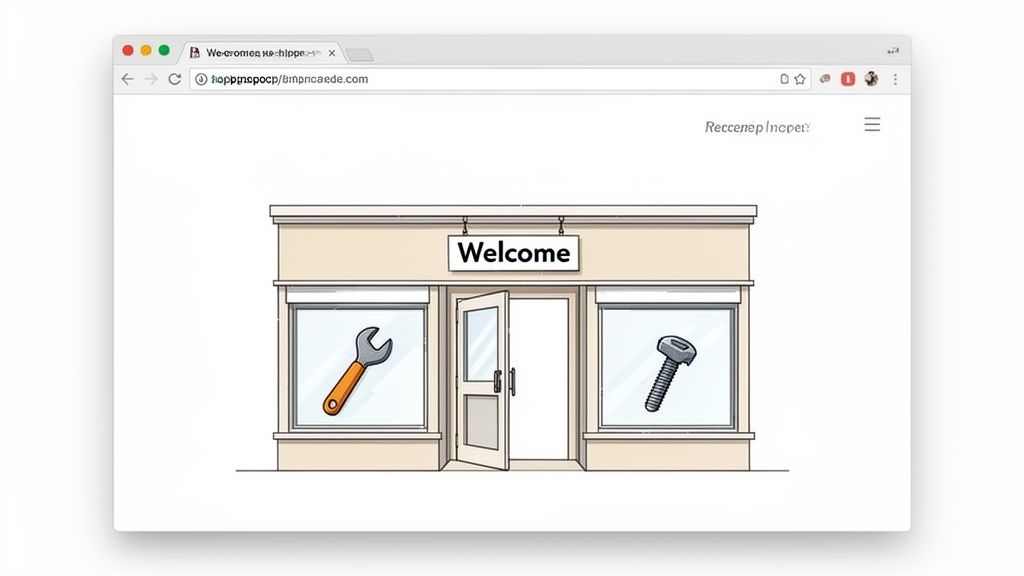
Think of your website as your digital shop front. When a potential customer shows up, you want them to feel welcome, see exactly what you offer, and find their way around without any trouble. A messy, confusing shop would make people walk straight back out, and a disorganised website does the exact same thing.
User experience isn't just about how your site looks; it’s about how it works and how it makes people feel. For a local service business, a great UX builds instant trust and quietly screams that you're professional, organised, and reliable.
The True Cost of Poor UX
A frustrating website experience does more than just annoy visitors—it actively sends them straight to your competition. If someone can’t find your phone number in a few seconds or gets stuck trying to fill out your contact form, they’ll just hit the 'back' button and call the next business on the Google search list. Simple as that.
This is especially true for service-based businesses in New Zealand. When someone has a burst pipe or needs an urgent repair, their patience is paper-thin. A clunky, complicated website is a massive roadblock that costs you real jobs and real money.
A good user experience isn't a "nice-to-have" any more; it’s a core part of a winning business plan. It’s the difference between a website that just sits there and one that actively generates leads and phone calls, week in and week out.
Key Benefits of a Strong User Experience
Putting some effort into your website’s user experience pays off in ways that directly help your bottom line. It’s about making your website work smarter, not just look prettier. As you dig into what this means, it's worth continuing to optimise user experience for even better results.
Here are the main wins for your business:
- Builds Customer Trust: A clean, easy-to-use site signals that your business is professional and has its act together.
- Increases Enquiries: When people can effortlessly find your contact details and request a quote, more of them actually will.
- Improves Google Rankings: Search engines like Google want to show their users the best, most helpful websites. A good user experience can help you climb those rankings.
At the end of the day, focusing on the user is the best way to grow your business online. If you're keen to learn more about the nitty-gritty, our guide to hiring a professional user experience designer can give you some deeper insights. It all starts with putting your customer first.
How to Make Your Website Easy to Navigate
Ever walked into a massive hardware store with no signs? You wander around, completely lost, trying to find a single packet of screws. If you can't find what you need or someone to help, you'll just get frustrated and leave. Your website is exactly the same—if people can't figure out where to go, they'll click away and find a competitor.
Good design for user experience is really just common sense. It's about making everything obvious. When a potential customer lands on your homepage, they should know instantly where to find your services, learn a bit about you, or get in touch. This clear, simple path is the foundation of a website that actually brings in jobs.
The fancy term for this is information architecture. It sounds complicated, but it's just about organising your website's content logically. Think of it as creating clear aisles and signposts in that hardware store. It guides visitors exactly where they need to go without any guesswork.
Creating Clear Signposts for Your Visitors
Your website's main navigation menu is your most important set of signposts. It needs to be simple, clear, and totally focused on what your customers are looking for. Resist the urge to cram every single page you have into the menu; a cluttered navigation bar just creates confusion.
For most service businesses, a handful of key pages is all it takes to get started. Just think about the first few questions a customer usually has and give each one its own page.
Here are the non-negotiable pages every service website needs:
- Homepage: This is your digital front door. It needs to quickly say what you do and who you help.
- Services: A straightforward breakdown of what you offer. You can have one main page or separate pages for each major service if they need more detail.
- About Us: Here’s where you build trust and tell your story. People want to know who they're hiring.
- Contact Us: This page must be impossible to miss. It should have your phone number, email, and a simple contact form.
The rule of thumb we live by is the three-click rule. A potential customer should be able to get from your homepage to the critical information they need—like your emergency call-out number—in three clicks or less. Any more than that, and you risk them giving up.
From Confusing to Clear: An Example
Let’s look at how getting the structure right can make a world of difference. Good information architecture turns a digital mess into a straight line for your customers, showing them you’re professional and making it dead simple for them to hire you.
A great user experience means a visitor never has to stop and think, "Now where do I click?" The path should feel completely natural. This table shows what that looks like in the real world.
Simple Website Structure for Service Businesses
| Page or Element | Confusing Structure (What to Avoid) | Clear Structure (What to Do) |
|---|---|---|
| Menu | Vague labels like "Offerings" or "Info". | Simple labels like "Services" and "Contact". |
| Services | All services are crammed onto one long page. | A main services page with links to separate pages for each specific service. |
| Contact Info | Phone number is only on the contact page. | Phone number is clearly visible on every page, usually in the top corner. |
| Homepage | Too much text and too many options. | A clear headline, a brief intro, and obvious buttons to key pages. |
When you keep your website’s structure simple and logical, you make it easier for people to find what they need. And more importantly, you make it easier for them to pick up the phone and hire you.
Why Your Website Must Work Perfectly On Mobile
Picture this: a potential customer’s pipe has just burst. They’re standing in a puddle, frantically searching for a plumber on their phone. They land on your website, but it’s a mess – slow to load, clunky to navigate, and the text is too small to read.
They’re not going to pinch and zoom to figure it out. They'll hit the back button and call your competitor. Job lost.
These days, how your website performs on a phone isn't a bonus feature; it's the main event. Most of your customers will find you on their mobile, often when they’re in a hurry and need your help now. A bad mobile experience is a guaranteed way to hand work to someone else.
This is where a mobile-first approach changes the game. It simply means we design your website for the smallest screen first – the mobile phone. This forces us to prioritise what’s most important, ensuring the critical information is front and centre for the majority of people who visit your site.
The Need For Speed On Small Screens
On mobile, speed is everything. When someone is on their phone, they expect instant results. Research has shown that if your site takes more than a few seconds to load, a massive chunk of your visitors will just leave.
For a service business, every single second counts. A slow website doesn't just look unprofessional; it directly costs you leads. Someone with an urgent problem isn't going to wait around. They need a fast, simple way to find your number and call you.
This is especially true when it comes to local search. Google knows that mobile users want quick answers, so it rewards websites that load fast and provide a great experience on phones. A speedy mobile site can actually help you rank higher in local search results, making it much easier for customers to find you in the first place. We break this down even further in our guide on why mobile SEO matters for your business.
Connecting With Kiwi Customers On Mobile
For New Zealand businesses, getting mobile right is non-negotiable. The data is clear: a huge 74% of visitors are more likely to return to a website if it works well on mobile. Pair that with the fact that nearly 80% of New Zealanders shop online, with a huge preference for mobile-friendly sites, and the message is loud and clear. If your site is a pain to use on a phone, you’re shutting the door on most of your potential customers. You can dig into more of the numbers by checking out the latest UX statistics.
This infographic nails the difference between a clear, easy-to-use design and a confusing one.
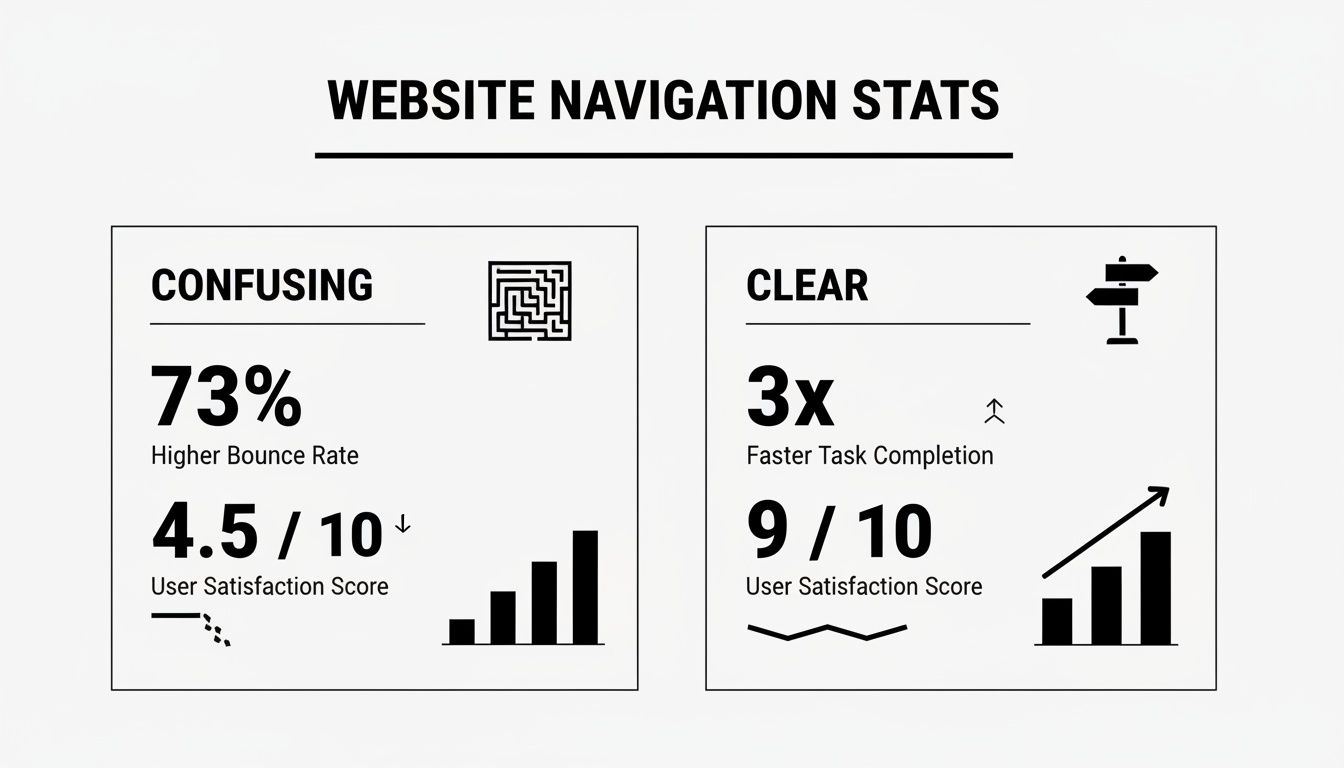
The takeaway? Simple navigation keeps people happy and makes them far more likely to do what you want them to do, like calling you for a quote.
What Makes A Great Mobile Experience
A great mobile website isn't about flashy animations or complicated features. It’s about nailing the basics and making it incredibly easy for someone to get what they need from you on a small screen.
Here are the must-haves:
- Responsive Design: This just means your website automatically adjusts its layout to fit any screen, from a small phone to a massive desktop monitor.
- Large, Tappable Buttons: Buttons need to be big enough for a thumb to tap easily without hitting the wrong thing by mistake.
- Simple Forms: Nobody wants to fill out a 10-field form on a tiny keyboard. Your contact forms should only ask for the absolute essentials.
- Click-to-Call Numbers: Your phone number shouldn't just be text; it should be a link. One tap, and they're calling you.
Ultimately, a fantastic mobile website experience tells your customers that you are professional, modern, and you care about making their lives easier. It’s often the first impression they have of your business, so making it a great one is crucial for turning those clicks into calls.
Designing Buttons and Forms to Get More Leads
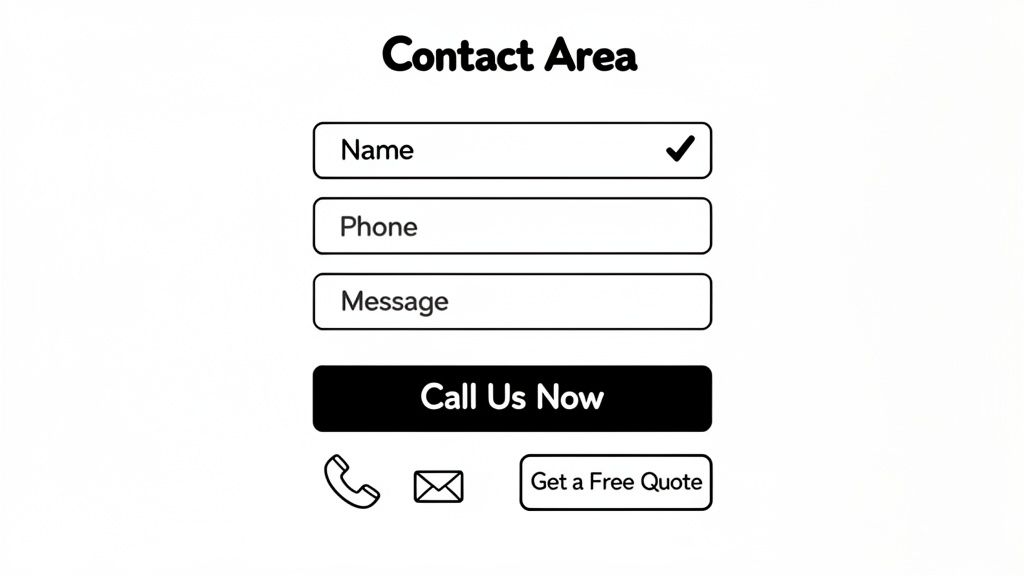
At the end of the day, your website's main job is to make your phone ring. The two things that make this happen are your call-to-action (CTA) buttons and your contact forms. They are the final, crucial step a visitor takes before becoming a genuine lead.
A CTA is just a fancy name for a button that tells someone what to do next—think 'Call Us Now' or 'Get a Free Quote'. When you design for user experience, you’re making these elements impossible to miss and dead simple to use. It’s amazing how a few small tweaks can dramatically change how many enquiries you get.
We’re not just sticking buttons and forms on a page; we’re creating a clear, easy path for customers to hire you. Let's break down how to get these essential parts of your website working much harder for your business.
Making Your Buttons Stand Out
A call-to-action button needs to scream for attention. If it just blends in with the rest of your website’s colours and design, people will scroll right past it without a second thought. The goal is to make it the most obvious thing on the screen.
Colour is your secret weapon here. Your CTA button should use a strong, contrasting colour that pops against your site's background and branding. If your website is mostly blue and white, a bright orange or green button will jump right out.
The words on the button matter just as much. They need to be short, sharp, and tell people exactly what will happen when they click.
- Bad: "Submit" or "Click Here"
- Good: "Get Your Free Quote Now"
- Good: "Call for a 24/7 Call-Out"
This kind of specific, action-oriented language removes any guesswork. It gives people the confidence to take that final step.
Designing Forms That People Actually Complete
Ever started filling out a form online, only to give up halfway through because it felt like an interrogation? It's a massive problem for countless businesses. A long, complicated contact form is one of the biggest roadblocks you can put in front of a potential customer.
The secret to a great contact form is brutal simplicity. Only ask for the absolute bare minimum you need to start a conversation. For most Kiwi service businesses, that’s usually just three things.
- Name: So you know who you’re talking to.
- Phone Number: So you can call them back quickly.
- A brief message: So you have a rough idea of what they need.
That's it. Fight the urge to ask for their address, email, or a dozen other details. Every single extra field you add increases the chance that someone will just give up and leave. You can always get more info when you chat with them on the phone.
Keep the form design itself clean and simple, with big, easy-to-click fields that work perfectly on a mobile screen. This focus on a smooth design for user experience shows you respect your visitor's time and makes it painless for them to get in touch. For more on this, check out our guide to high-converting service website design.
Ultimately, your buttons and forms are the gateways to new jobs. By making them stand out, using clear language, and keeping your forms ridiculously short, you turn your website from a simple online brochure into a machine that consistently brings in new leads.
Understanding Your Customers for a Better Experience
To get your design for user experience right, you first have to know who your customers are and what they actually need from you. This isn't about guesswork. It's about getting inside their heads, understanding their problems, and then making your website the perfect solution. A great website feels less like a billboard and more like a helpful conversation.
Imagine you’re a sparky in Auckland trying to get more jobs from local homeowners. Your website shouldn't just be a list of services. It needs to speak directly to their real-world worries—the flickering lights in the kitchen, dodgy wiring, or a complete power outage on a Sunday night. When you use their language to solve their problems, you build instant trust.
This approach shows you get it. It makes visitors feel like you’re talking directly to them. And when a potential customer feels like your website was built just for them, they’re far more likely to call you instead of the other guy. This isn't just fluffy design talk; it's smart business.
Putting Yourself in Your Customer's Shoes
The easiest way to understand your audience is to think like them. What are their biggest headaches? What questions are they frantically typing into Google when something goes wrong? Knowing this lets you create a website that gives them the answers they need, positioning you as the go-to expert.
This means you have to ditch the one-size-fits-all approach. For example, a plumber’s website shouldn't just say, "we fix leaks." It needs specific pages for "emergency burst pipe repairs" or "blocked drain services," because that's exactly what people search for in a panic.
When your website directly answers a visitor's urgent question, you're no longer just another business on a list. You become the obvious solution to their problem. This is the core of effective user experience.
Using Data to Make it Personal
These days, good web design isn't about hunches; it's about using information to make smarter decisions. Here in New Zealand, businesses are seeing massive wins by using data to personalise their marketing. When you tailor your message, people actually pay attention. For instance, segmented email campaigns in NZ have seen open rates jump from 28% to 39% since 2020. That’s a huge difference, and the same principle applies to your website. You can dig into more of these trends in the 2024 digital marketing report for New Zealand.
For tradies and local professionals, this is a game-changer. A generic website that tries to appeal to everyone ends up connecting with no one. You need to create an experience that feels personal and relevant to your ideal customer.
How to Figure Out What Your Customers Want
Getting to know your customers isn't a one-off task; it's an ongoing process. You need to constantly listen to what they're telling you, both with their words and their actions. How they use your website gives you all the clues you need.
Here are a few simple ways to get started:
- Just ask: When a new customer calls, ask how they found you and what made them pick up the phone.
- Check your contact forms: What are the most common problems people are writing in about? That's your goldmine.
- Look at your website stats: See which pages get the most traffic. This tells you what people care about most.
A crucial part of this is creating simple ways of gathering user feedback. You don't need complicated systems; just listen. By paying attention, you can keep tweaking your website to serve your audience better, which always leads to more and better leads for your business.
Your Simple User Experience Checklist
Getting the user experience right isn't about one massive, complicated project. It's about nailing a bunch of small, simple things that add up. This checklist pulls together all the key ideas we've talked about into a practical tool you can use right away.
Think of it as a quick health check for your website. Walk through these questions to spot the easy wins that will improve your design for user experience and start getting you more leads.
First Impressions and Basic Clarity
Your homepage is your digital handshake. A potential customer needs to know exactly what you do and who you help within seconds of landing on your site. If they have to think, they'll leave.
- Is it dead obvious what you do? Can a first-time visitor figure out your main service in less than five seconds?
- Is your phone number easy to find? It needs to be right at the top of every single page, clear as day.
- Is your menu simple? Your main navigation should only have a few clear options, like "Services" and "Contact". Don't overcomplicate it.
Get these basics wrong, and it doesn't matter how good the rest of your site is. A confused visitor is a lost lead.
Mobile Experience and Speed
Most of your customers are going to find you on their phones, probably while they're out and about and need your help urgently. A clunky, slow mobile site is a guaranteed way to lose the job to a competitor.
Remember, a slow website doesn't just test a visitor's patience; it tests their willingness to hire you. In their eyes, a slow site often suggests a slow service.
Use this part of the checklist to see how your site holds up where it matters most—in the palm of your customer's hand.
- Does your website load in under three seconds? Speed is everything, especially on a mobile connection.
- Is the text easy to read on a phone? People shouldn't have to pinch and zoom to figure out what you offer.
- Are your buttons big enough to tap? Every button and link needs to be easy for a thumb to hit without accidentally clicking something else.
- Can you click to call your phone number? Make sure your number is a tappable link, not just plain text.
Getting Leads and Making Contact
This is where the rubber meets the road—turning a visitor into an actual lead. The path to getting in touch with you has to be completely smooth and frustration-free.
- Do your 'Call to Action' buttons stand out? Use a bright, contrasting colour for buttons like "Get a Free Quote" so they're impossible to miss.
- Does your contact form only ask for the basics? Stick to the essentials: name, phone number, and a short message. Every extra field you add lowers the chance they'll complete it.
- Is there a clear next step on every page? Each page should guide the visitor on what to do next, leaving no room for guesswork.
This simple checklist is your starting point. By running through these questions, you can make real, meaningful changes that create a better experience for your customers and get your phone ringing more often.
Frequently Asked Questions
When you get down to the nuts and bolts of how you actually design for user experience, it's only natural for business owners to have a few questions. We've answered the most common ones here with simple, straight-up advice to help you make the right calls for your website.
How Much Does Good User Experience Design Cost?
Here’s the thing: good user experience isn't an 'extra' you tack on at the end. It's a core part of any professional website design package. Instead of seeing it as a separate line item, think of it as the foundational investment that makes sure your website actually works to bring in customers.
A cheap website with poor UX might feel like a win at first, but it'll cost you dearly in lost jobs and missed phone calls down the line.
Investing in a professional website that’s built around the user from day one is always the more cost-effective choice. It’s designed from the ground up with one goal: turning visitors into genuine enquiries for your business.
Can I Improve the UX of My Existing Website?
Yes, absolutely. You don't always need to tear everything down and start from scratch to see a massive improvement in your user experience. Focusing on a few key areas can make a huge difference, fast.
A great first step? Grab your phone and try to use your own site. Is it a breeze to navigate, or is it a bit of a mission? Often, it's the small, targeted tweaks that deliver the biggest wins.
Here are a few simple fixes you can make right away:
- Make your contact details impossible to miss: Your phone number should be screamingly obvious on every single page.
- Simplify your main menu: A clean, uncluttered navigation helps people find what they’re looking for without the frustration.
- Check your call-to-action buttons: Make sure they use a colour that pops right off the page.
- Shorten your contact form: Chop it down to the absolute essentials. Name and phone number are usually all you need.
These small, steady improvements can have a huge impact on how many enquiries land in your inbox each month.
How Do I Know If My Website Has Good User Experience?
You don't need fancy, expensive tools to get a gut feeling for how your website is performing. One of the most powerful tests you can do is the "friend and family" test. Ask someone who has never seen your site before to complete a simple task.
Tell them to find your phone number or fill out the contact form. Then, just sit back, keep quiet, and watch what they do.
If they get stuck, look confused, or can't find what they need in a few seconds, you've just found a UX problem. It’s a dead-simple but incredibly effective way to see your website through a fresh pair of eyes.
You can also look at the data. If you see that lots of people are visiting your site but only a tiny fraction are actually getting in touch, that's a massive red flag. It usually means a poor user experience is putting a wall between them and that "Enquire Now" button.
Are you ready to stop losing leads to a frustrating website? The team at Four Stripes specialises in building conversion-focused websites for Kiwi service businesses that make the phone ring. We combine smart design and local SEO to help you dominate your local area. Let's build a website that works as hard as you do.