
Put simply, NZ web hosting is the service that stores your website files on a server located right here in New Zealand, making them available online for your Kiwi customers. Think of it as renting a local plot of land for your digital storefront. It’s a decision that has a huge impact on your site's speed, trustworthiness, and how many calls you get.
What Is NZ Web Hosting and Why It Matters for Your Business

Imagine your website is your actual shop. Web hosting is the land and the building it sits on. If you pick a host in the US or Europe, it's like setting up shop in another country. Sure, you're open for business, but your local Kiwi customers have a long way to travel, making their visit slow and frustrating. Nobody likes a slow website.
On the other hand, choosing NZ web hosting is like opening your doors right on the local high street. Your customers are just around the corner, so they get in the door much faster. This isn't just a minor technical detail; it's the foundation of a solid online presence for any service-based business in New Zealand.
The Core Benefits of Local Hosting
Going with a local provider isn't just about patriotism; it delivers real-world advantages that translate directly into more business. It’s a smart move that improves everything from the user experience right through to your bottom line.
Here’s what really matters:
- Faster Website Speeds for Kiwis: When your website is hosted locally, the data doesn't have to crawl across thousands of kilometres of undersea cables to reach your visitors. That physical closeness slashes loading times, creating a smooth experience that keeps potential customers on your site instead of clicking away.
- Local Support in Your Time Zone: There's nothing worse than having a website problem at 2 PM on a Tuesday, only to find the support team is fast asleep on the other side of the world. With a New Zealand host, you get help from people who actually understand the local market and are awake during your business hours.
- Enhanced Security and Trust: Storing customer data on local servers helps you stay on the right side of the NZ Privacy Act. This commitment to keeping data here at home builds massive trust with your clients, showing them their personal information is kept safe and sound.
Choosing the right web host is one of the most important first steps in building an effective online presence. It sets the stage for everything that follows, including how well your site ranks on Google and how many leads it generates.
This focus on local digital infrastructure is growing fast. New Zealand's data processing and web hosting market is expected to hit NZ$939.2 million in 2025, growing at a steady clip of 6.9% each year since 2020. This tells you that reliable local hosting is now seen as a business essential, not just an IT afterthought.
A well-hosted website is a core part of any powerful online strategy. If you're building a new site from scratch, you should also check out our guide on https://fourstripes.co.nz/small-business-website-design-nz/. For a deeper dive into why this type of infrastructure matters for scaling up, have a read of the benefits of cloud hosting for growth.
Choosing the Right Type of Hosting for Your Business
Trying to pick the right NZ web hosting can feel a bit like learning a new language. The good news is, it's actually much simpler than it looks. It all comes down to picking the right tool for the job—and for your specific business.
Think of it like choosing a commercial space. Each hosting type gives you a different level of power, control, and day-to-day management. Getting this right from the start means your website has a solid foundation to bring in and serve your customers without any headaches.
Let’s break down the main options you’ll come across.
Shared Hosting
Think of Shared Hosting as setting up shop in a co-working space. It’s the most affordable and common starting point for a reason. Your website shares a single server—and its resources like memory and processing power—with lots of other websites.
This is the perfect setup for new businesses, sole traders, or anyone just dipping their toes into the online world. It's cheap and cheerful, but there is a catch. If one of your "neighbours" gets a massive surge in traffic, it can sometimes slow your site down too.
Virtual Private Server (VPS) Hosting
The next step up the ladder is VPS Hosting. Sticking with our property analogy, this is like leasing your own private office in a larger commercial building. You're still sharing the main structure (the physical server), but your space is walled off with its own guaranteed resources that nobody else can touch.
A VPS gives you a serious boost in power, control, and privacy compared to shared hosting. It's the logical choice for growing businesses that are starting to find their shared plan a bit cramped, need to handle more website traffic, or want to install custom software.
Your choice of hosting directly influences your website's performance, security, and ability to grow. Matching the hosting type to your business stage ensures you're not paying for power you don't need or limiting your potential with a plan you've outgrown.
Managed WordPress Hosting
If your business website runs on WordPress, Managed WordPress Hosting is a game-changer. Imagine this as a fully kitted-out workshop, perfectly tooled up for one specific craft. The hosting provider handles all the tricky, technical stuff for you, so you don't have to.
This usually includes:
- Automatic WordPress Updates: Your site's core software and plugins are kept up-to-date, patching any security gaps.
- Beefed-Up Security: Proactive malware scans and firewalls built specifically to protect WordPress sites.
- Daily Backups: Peace of mind knowing you can restore your site in a few clicks if something goes wrong.
- Expert Support: You get access to a support team that lives and breathes WordPress.
It’s a completely hands-off approach that lets you focus on running your business instead of playing part-time IT technician. If you want to see who the best players are in this space, check out our guide on the top New Zealand hosting companies.
Cloud Hosting
Last but not least, we have Cloud Hosting. This is the most flexible and scalable option of the lot. Think of it like a pop-up shop that can instantly expand or shrink its floor space depending on how many customers walk through the door. Instead of living on just one server, your website is powered by a whole network of connected servers.
If your site suddenly gets a flood of visitors—maybe from a successful ad campaign—cloud hosting automatically pulls in more resources to handle the load without crashing. This makes it perfect for businesses with unpredictable traffic or those planning for rapid growth, as you typically only pay for what you use.
Hosting Type Comparison for NZ Service Businesses
Feeling a bit overwhelmed? Don't worry. This table breaks down the key differences to help you figure out which hosting type is the right fit for your business right now.
| Hosting Type | Best For | Analogy | Typical Monthly Cost (NZD) |
|---|---|---|---|
| Shared Hosting | New businesses, sole traders, simple brochure sites, and blogs. | A co-working space | $5 – $15 |
| VPS Hosting | Growing businesses, small e-commerce sites, and websites with moderate traffic. | A private office in a larger building | $30 – $80 |
| Managed WordPress | Any business using WordPress that values speed, security, and expert support. | A fully serviced workshop | $40 – $100 |
| Cloud Hosting | Businesses with fluctuating traffic, high-growth startups, and large e-commerce stores. | A pop-up shop that can resize instantly | $50 – $200+ |
Ultimately, choosing the right hosting isn't a lifelong commitment. The best strategy is to pick the plan that fits your business today, knowing you can always upgrade as you grow. Getting it right from the start just means fewer headaches down the road.
Essential Hosting Features Every Service Business Needs
Once you've got a rough idea of the type of NZ web hosting your business needs, it's time to get into the details. Think of it like buying a new ute. You’ve decided on the make and model, but you still need to check under the bonnet and make sure it has a solid engine, good security, and won't guzzle gas.
For a business website, some features are simply non-negotiable. It’s not just about getting online; it’s about staying online, being secure, and loading fast enough to turn a visitor into your next paying customer. Let's break down the absolute must-haves.
The Uptime Guarantee
Uptime is just a fancy way of saying "how often your website is actually working and available." Your website is your digital front door, so uptime is about making sure that door is always open for business. Every minute it's down, you're losing potential leads and damaging your reputation.
You should never settle for less than a 99.9% uptime guarantee. While a perfect 100% is impossible—tech is tech, after all—99.9% means your site will be down for no more than 43 minutes over an entire month. Anything less than that is a major red flag.
This visual guide helps map out where your business fits and what kind of hosting foundation you should start with.
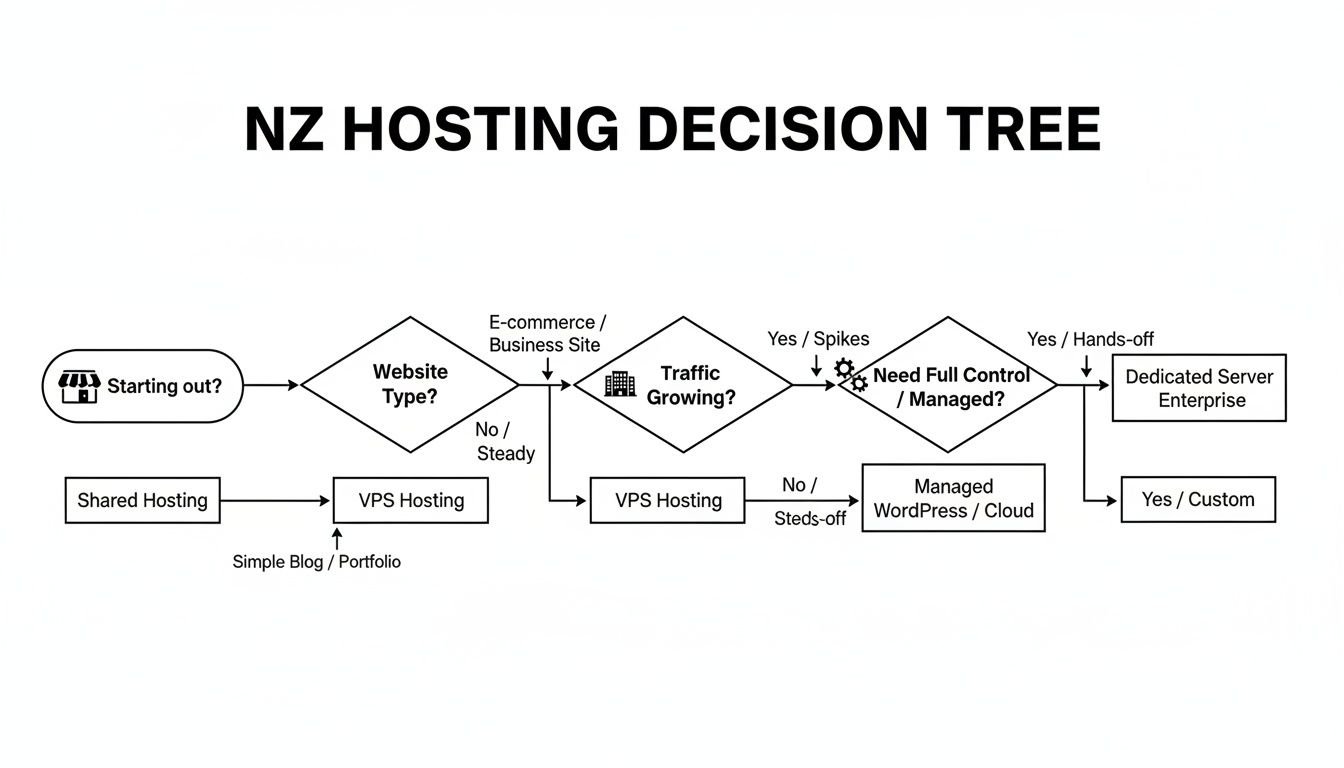
As you can see, your hosting needs will change as your business grows. What works when you're just starting out won't be enough once you're established and need a more hands-off solution.
Automatic Daily Backups
Picture this: you install a new plugin, and it breaks your entire website. Or worse, your site gets hacked. Without a recent backup, you could lose everything—years of blog posts, customer enquiries, and all your hard work. This is exactly why automatic daily backups are your digital insurance policy.
A good NZ web host will take a full snapshot of your site every single day and tuck it away somewhere safe. If disaster strikes, you can restore your site to a working version with a few clicks. It turns a potential catastrophe into a minor inconvenience.
A Free SSL Certificate
Ever notice the little padlock symbol in your browser's address bar? That’s an SSL (Secure Sockets Layer) certificate at work. It creates a secure, encrypted link between your website and your visitors, protecting any details they enter, like their name and phone number on your contact form.
An SSL certificate isn't a "nice-to-have" anymore; it's essential. Browsers like Google Chrome will slap a big "Not Secure" warning on any site without one, which is guaranteed to scare potential customers away.
Most decent hosts now throw in a free SSL certificate with their plans. Not only does it build trust, but Google also uses it as a small ranking factor, giving secure sites a little boost. There's absolutely no reason to pay extra for this.
Server Speed and Location
Website speed is huge. We’ve all done it—clicked on a link, waited a few seconds, got impatient, and hit the back button. Research shows that if your site takes more than three seconds to load, a big chunk of your visitors will disappear. A slow website is the online equivalent of a customer walking out of your shop because the queue is too long.
This is where the server location comes in. Choosing an NZ web host with servers physically located in New Zealand (like Auckland) massively cuts down the distance your website data has to travel to reach your Kiwi customers. This means a faster, much more responsive experience for your local audience.
Local Kiwi Support
Finally, never, ever underestimate the value of having a real person in New Zealand to call when things go wrong. When your website is down or your emails aren't sending, the last thing you want is to be stuck on hold with an overseas call centre in a completely different time zone.
A quality NZ host will have a local support team ready to help during your business hours. They speak your language, understand the local market, and can sort things out quickly. Good support isn't a feature; it's a lifeline that will save you a world of stress.
How to Move Your WordPress Site to a New NZ Host
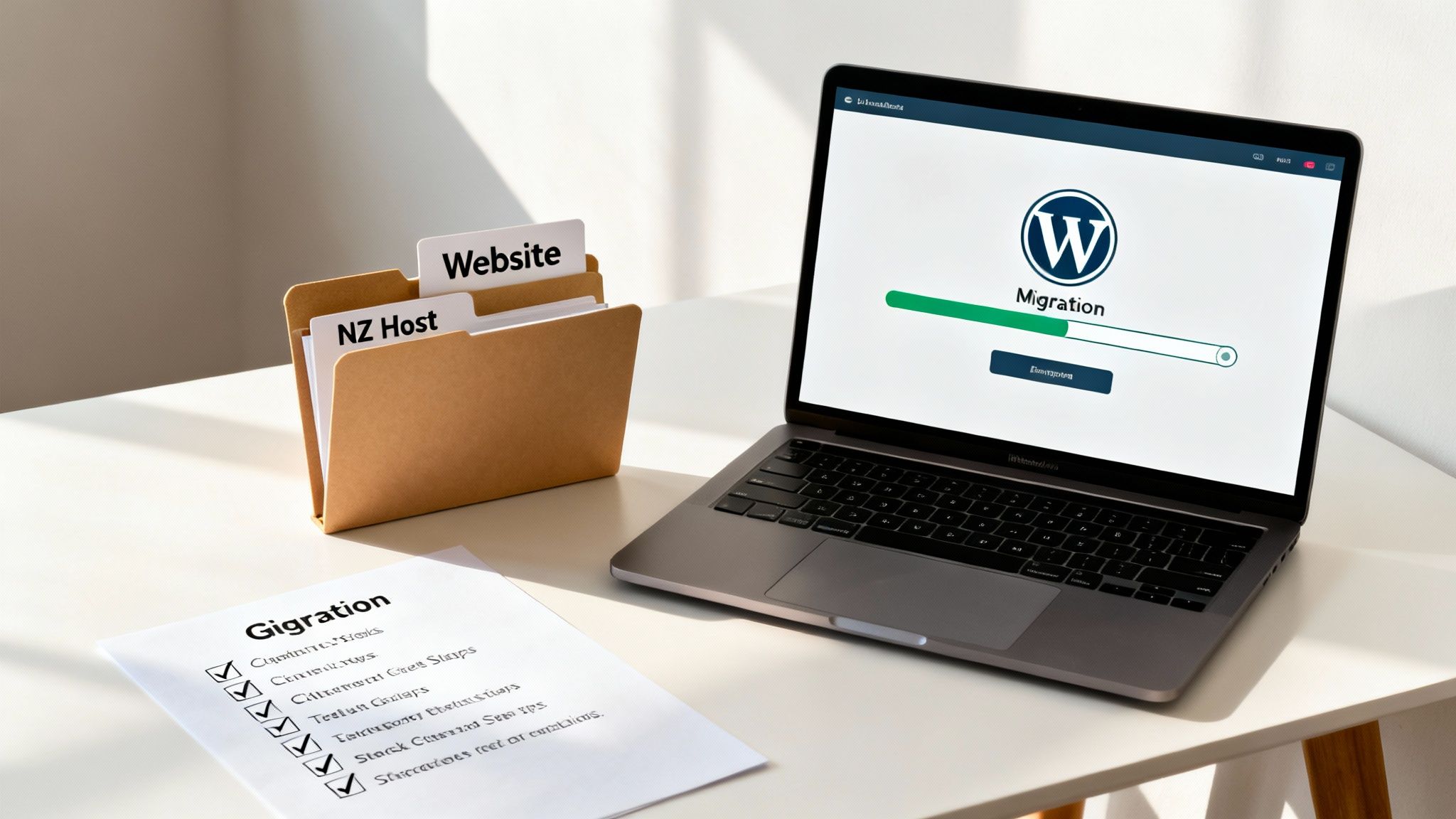
The thought of switching your WordPress website to a better NZ web host can feel like a massive technical headache. But the good news is, the whole process is way more straightforward than you’d think. With a solid plan, you can get your site moved over smoothly, landing it in its new home without disrupting your business for a second.
Think of it like moving your shop to a better spot across town. You wouldn’t just throw everything in a van and hope for the best. You’d do an inventory, plan the move, and make sure everything is working perfectly at the new premises before you open the doors. Migrating your website follows the exact same logic.
This simple checklist will walk you through it, so you can make the change with confidence and get your site running faster on its new foundation.
Step 1: Prepare for the Move
Before you do anything else, the first and most critical step is to take a complete backup of your website. This is your safety net. It means that no matter what happens during the move, you have a perfect copy of your site ready to be restored in minutes.
Your backup needs two key parts:
- Website Files: This is all your themes, plugins, and every single image you've uploaded.
- Database: This is the brains of the operation—all your pages, blog posts, comments, and site settings live here.
Any decent NZ web host will have tools in their control panel to make this easy. Once you’ve created the backups, download both the files and the database to your own computer for safekeeping. Whatever you do, don't skip this step.
Step 2: Handle the Migration
Once you have your backup tucked away safely, it's time to actually move the site. You've got two main options here, and frankly, one is a whole lot easier for busy business owners.
The best NZ web hosting companies want your business, and they’ll make it as easy as possible for you to switch. A free, professionally handled migration is the sign of a provider that gets you don’t have time for technical dramas.
Your first option is the DIY route using a WordPress migration plugin. These tools can bundle your entire site into one file, which you then upload to your new hosting account. It works, but it helps to be a bit tech-savvy.
The second option, which we highly recommend, is to take advantage of a free migration service. Most top-tier hosts will move your entire website for you, completely free of charge. Their expert team handles the whole thing, ensuring a seamless, error-free transfer. It’s the best choice because it saves you time and stress. To understand what features matter most, you can learn more about premium WordPress website hosting and what sets it apart.
Step 3: Test Everything Before Going Live
After the move is done, your new host will give you a temporary link or a way to preview the site on their servers before anyone else sees it. Now’s your chance to play detective.
Click through every single page. Make sure all your images are loading and that every link works. Most importantly, test all the ways a customer can contact you:
- Fill out your contact forms and check the enquiries actually land in your inbox.
- Click on your phone number links to make sure they open the call function on a mobile.
- Test your email links to see if they open a new message correctly.
Once your site is happily settled on its new NZ host, getting it optimised for search engines is the next job. You might want to compare leading WordPress SEO plugins like Yoast and All in One SEO to figure out which one fits your strategy. Catching any small glitches now saves you from losing customers later.
Step 4: Point Your Domain to the New Host
When you are 100% satisfied that the site is working flawlessly on its new server, you’re ready for the final step. The last thing to do is update your domain's DNS (Domain Name System) settings to point to your new NZ web host. Your new provider will give you the exact nameserver details you need to use.
You’ll make this change wherever you originally registered your domain name. It can take a few hours for the update to spread across the internet, but once it does, every visitor will be sent to your faster, more reliable new website. Job done.
Understanding Hosting Costs, Security, and NZ Compliance
When you're hunting for NZ web hosting, it’s easy to get drawn to the cheapest plan on the market. But treating your website's foundation like a bargain-bin find is a classic mistake, especially when your site’s whole job is to get the phone ringing. The price of a hosting plan comes down to the important stuff: server performance, security, and proper local support—all things that make or break your business online.
Thinking about the price difference between a cheap plan and a good one is like comparing a flimsy padlock to a proper alarm system. Sure, they both technically lock the door, but only one gives you real peace of mind. The true value isn't in the lowest monthly fee, but in the reliability you get for your money. A few extra dollars a month for a faster, more secure site can pay for itself with just one new job.
Investing in solid online infrastructure is becoming a no-brainer for Kiwi businesses. New Zealand's entire IT sector is on the up, with projections showing IT services growing from NZ$7.12 billion in 2025 to NZ$8.52 billion by 2029. This isn't just numbers; it shows a big shift in how local business owners see their online presence as a critical part of staying in the game. You can check out more insights on the NZ IT market on Teksystems.
Protecting Your Digital Front Door
Website security sounds complicated, but the basics are pretty simple. Your hosting provider should be your first line of defence, giving you the tools to protect your business from the usual online riff-raff. These aren't fancy add-ons; they're non-negotiables for any serious business.
Think of these two features as your website's personal security team:
- Web Application Firewall (WAF): This is like a bouncer at the door of your website. It sits between your site and the internet, checking everyone who tries to come in. It spots and blocks hacking attempts and dodgy bots before they even get a chance to cause trouble.
- Malware Scanning: This is your security guard doing regular patrols. A good host will automatically scan your site's files for any nasty code that might have snuck past. If it finds something, it locks it down and lets you know, stopping it from damaging your site or stealing customer info.
Without these, your website is basically an open door for trouble, leaving your business and your customers' data completely exposed.
A secure website isn't just about protecting your files; it's about protecting your reputation. A hack can destroy years of customer trust in a single afternoon—and that’s a lot harder to fix than a broken website.
Staying on the Right Side of NZ Law
If you do business in New Zealand, you need to know about data sovereignty and our local privacy laws. This is where choosing a proper NZ web hosting provider gives you a massive advantage. It’s not just about speed; it's about compliance and showing your customers you can be trusted.
When someone fills out your contact form, you're collecting their name, phone number, and email. That info needs to be looked after properly. The NZ Privacy Act 2020 is very clear about how businesses must handle personal information. Storing that data on servers in another country can get messy fast, because now you might be subject to their laws, too.
By picking a host that keeps your data right here in New Zealand, you keep things simple and compliant. More importantly, you're sending a clear signal to your customers: you take their privacy seriously and you're committed to keeping their information safe at home. That local trust factor is a huge deal and can easily set you apart from competitors using cheap overseas hosting.
Frequently Asked Questions About NZ Web Hosting
Choosing the right web host is a big decision, and it’s normal to have a few questions before you commit. Getting this right from the start is one of the best things you can do for your business's online presence.
We get it. You just want straight answers without the technical jargon. Here are the most common questions we hear from Kiwi business owners, answered in plain English.
Can I Just Use a Cheaper Overseas Host?
It's tempting, for sure. You see a low price from a big American hosting company and think, "Why pay more?" But for a local NZ business, this is almost always a false economy. You might save a few dollars a month, but you'll likely lose far more in missed jobs and frustrated customers.
The biggest killer is website speed. When your site is hosted on a server in the US or Europe, the data has to physically travel halfway around the world to reach your customers in New Zealand. That journey takes time, causing a noticeable lag before your site loads. A slow website doesn't just annoy visitors; it actively hurts your ability to show up in Google's local search results.
Then there's the support issue. A pipe bursts at a client's house at 2 PM on a Tuesday, your site goes down, and you need help now. But the support team for your cheap host is fast asleep in another time zone. A quality NZ host gives you a fast site, support when you actually need it, and ensures your data is kept safe under NZ law. Those benefits are worth way more than a small monthly saving.
Does Hosting Speed Really Matter for a Local Tradie?
Absolutely. You could argue it matters more for a local tradie than anyone else.
Picture this: someone’s kitchen sink has just exploded, and they’re frantically Googling “emergency plumber Auckland” on their phone. They need someone, and they need them five minutes ago.
If your website takes more than a couple of seconds to pop up, they’re gone. They’ll hit the back button and click on your competitor's site without a second thought. You just lost an urgent, high-value job because your website was too slow. A fast-loading site grabs that lead before they have a chance to even think about going elsewhere.
Website performance isn't just a techy thing; it's a lead-generation tool. For service businesses, a fast website directly translates into more phone calls and more filled-out contact forms.
Google knows this, too. A zippy website is a massive tick in their box for ranking you higher in Google Maps and local search, making it dead simple for local customers to find you first.
What Is the Difference Between a Domain Name and Web Hosting?
This trips a lot of people up, but a simple analogy makes it easy to understand. Think about setting up a physical shop.
- Your domain name (like
yourbusiness.co.nz) is your street address. It’s the unique address that tells people where to find you online. - Your web hosting is the actual building and the land it sits on. It's the physical space on a server where all your website’s files, images, and content are stored safely.
You can't have one without the other. You need the address so people can find you, and you need the building for them to arrive at. They're two separate services that work hand-in-hand to get your business online.
My Web Designer Hosts My Site. Should I Move It?
While it might seem convenient to let your web designer handle the hosting, it can create a really risky situation down the line. Your website is one of your most valuable business assets—you should always have full control and ownership of it.
Just think about what could go wrong:
- What if you fall out? If things go sour with your designer, they could hold your website hostage, and there’s very little you can do about it.
- What if they go AWOL? If they go on holiday, get sick, or even close down their business, you could be completely locked out of your own website.
- What about getting help? When something breaks, you’re stuck playing middleman, trying to get answers from your designer who then has to talk to the hosting company.
The best practice is simple: always have the hosting account registered in your business’s name with a professional NZ web host. Moving your site to your own account gives you security, control, and total peace of mind, ensuring your online front door is firmly in your hands.
Ready to build a powerful online presence on a rock-solid local foundation? At Four Stripes, we combine conversion-focused web design with fast, secure NZ web hosting to create websites that don't just look good—they get the phone ringing. Let's turn your website into your best source of local leads. Learn more at https://fourstripes.co.nz.